
Offline Music Player - Mixtube
ASH AND PINE MEDIAMusic & Audio
4.118.00 Reviews
- Version
- 1.0.0
- Installs
- 100.00K
- Age Rating
- Everyone
Screenshots
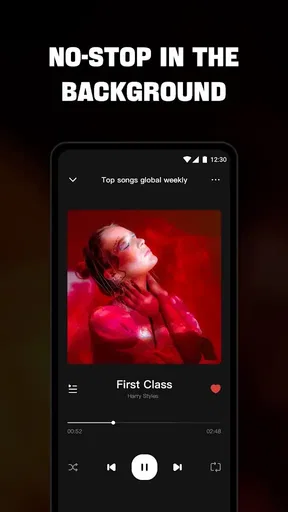

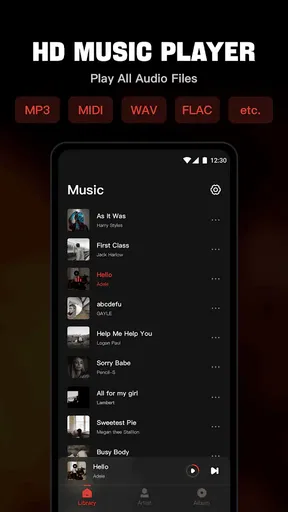

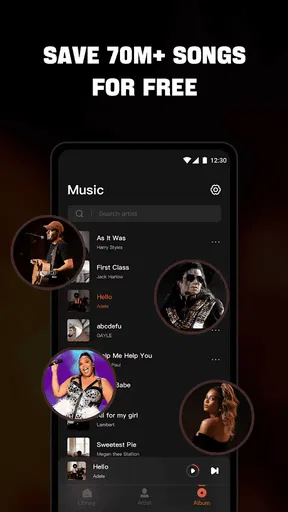
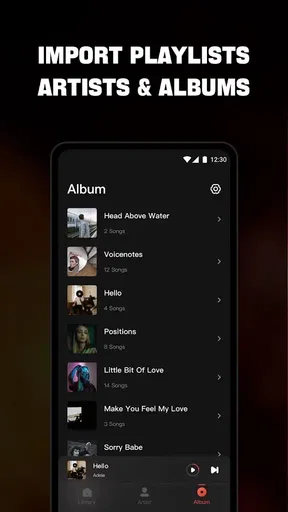
Our Review of Offline Music Player - Mixtube
 Analysis by Appyee
I approached Offline Music Player - Mixtube as a practical music and audio app rather than as a replacement for every streaming service on a phone. Its appeal is straightforward: it is free, works with offline MP3 listening, includes a tuner-style radio experience, and is aimed at people who want music available when a connection is unreliable. After spending time with that basic idea, I found that its value depends less on flashy extras and more on how well it fits the way you already keep and discover music.
The app comes from ASH AND PINE MEDIA and has reached over 100 thousand installs, with a 4.1 average from around 377 ratings. Those figures suggest that it has found a real audience, although they also tell me to keep expectations sensible: this is a relatively focused player, not an enormous music ecosystem with years of refinement behind it. The current release is version 1.0.0, so I would judge it mainly by the usefulness of its core listening workflow rather than by expecting a long list of mature extras.
How Mixtube feels during everyday listening
I focus here on how Mixtube fits into an ordinary listening routine, especially when you are deciding whether local MP3 playback is enough for your needs. I also look at the small preparation choices that can make a first session smoother, before moving on to what to try when the app or a file doesn’t behave as expected.
A simple starting point for offline MP3 playback
The first thing I like about this app is that its purpose is easy to understand. If you have MP3 files on your phone and want a dedicated place to play them without depending on Wi-Fi, Mixtube is aimed directly at that need. That makes it especially practical for commutes, travel, areas with patchy reception, or moments when you want to avoid using mobile data.
In ordinary use, the biggest performance expectation is not instant access to a huge online catalog. It is a quick transition from opening the player to choosing music already available on the device. That distinction matters. A streaming service usually gives you better discovery, playlists, recommendations, and account-based continuity. Mixtube makes more sense when control over local MP3 listening is more important than a cloud library.
I also see a useful separation between two listening moods. Offline playback is for music you have already collected, while the tuner radio side is for when you want something more spontaneous. That combination can reduce the need to jump between separate apps, but it does not turn local files into a streaming catalog. Anyone choosing it should be comfortable with that trade-off.
What affects perceived speed
With a local music player, speed is influenced by the amount and organization of audio stored on the phone. A small, tidy collection should be easier to browse than a device filled with years of loosely named files, duplicates, and incomplete downloads. I would therefore avoid judging the app only by its first launch. The more useful test is whether it remains manageable after you add the music you actually listen to.
There is also a practical preparation step that improves the experience: keep important MP3 files in a consistent location and use clear filenames. That is not a glamorous tip, but it can make finding an album or a specific track much faster than relying on vague file names. Mixtube benefits from good housekeeping because an offline player can only work with the audio that is properly present and recognizable on the device.
For a short listening session, the lightweight concept feels more important than a long feature list. I would use it when I want to open a player, select local music, and get on with my day. If your priority is elaborate sorting, synchronized playlists across several devices, or highly personalized discovery, a full streaming platform will probably feel more complete even if it requires a connection.
Handling heavier listening sessions
The more demanding scenario is not necessarily playing one song. It is browsing a large personal library while switching between local tracks and the radio function. That is where organization, storage conditions, and the phone itself can affect the experience. I would prepare a smaller travel folder or a few clearly named groups rather than expecting one enormous collection to remain effortless to navigate.
A useful workflow is to check your chosen music before leaving home. Confirm that the files are stored locally, open several different tracks, and make sure the player recognizes the collection. This avoids the common offline mistake of assuming that a title visible in a music-related app is automatically available without a connection. For Mixtube, the offline advantage is strongest when the user treats local preparation as part of the listening routine.
Radio listening has a different performance profile. It is naturally more dependent on connectivity than local MP3 playback, so I would not use that part as the reason to choose an offline player if my main goal is completely disconnected listening. Instead, I see it as a convenient companion feature: local music when I need certainty, tuner radio when I want variety and the connection is good enough.
A realistic day with the app
Imagine downloading a few MP3 albums before a long train journey. At home, I would organize them, open Mixtube, play several tracks, and confirm that the files are available without relying on the network. During the journey, I could use the local player through weak-signal sections and switch to the tuner radio when reception improves. That is a more realistic strength than claiming it replaces every music service.
The same workflow can help during a workout or a walk in an area where coverage changes. I would create a compact selection rather than carrying the whole library into the session. A smaller selection reduces browsing friction and makes the app feel more responsive simply because there are fewer choices to work through. It also makes it easier to notice which files are missing or mislabeled before leaving.
For a student, traveler, or listener with a carefully maintained MP3 collection, this is a sensible use case. For someone who expects to search for any artist immediately, build collaborative playlists, or move seamlessly between multiple devices, it is a weaker match. The app’s usefulness comes from its focused offline role, not from pretending that local playback and streaming are identical.
Reliability and recovery when something goes wrong
Reliability in an offline player is about more than whether a song starts. I also care about what happens after an interrupted session, a change in connectivity, or a file that the player cannot use. Local playback should be the stable part because it does not depend on a live signal, while radio listening naturally has more variables outside the app’s control.
If a track does not play, I would first check the file itself rather than immediately blaming the player. Try another MP3 from the same collection, confirm that the file is stored on the phone, and inspect whether the problem follows one song or affects the whole library. This simple comparison helps separate a damaged or unusual file from a broader app issue.
When moving between offline music and radio, I would also allow a moment for the change rather than repeatedly tapping controls. Network-dependent audio can behave differently from a local file, especially when signal quality changes. A calm recovery routine—return to a known local track, verify that playback works, then try the radio again—makes the app easier to live with than treating every interruption as a failure.
Because the current version is 1.0.0, I would keep the recovery process uncomplicated and avoid building an essential daily routine around features beyond the core player and radio concept. The app has a solid reason to exist, but early versions can feel less predictable around edge cases than long-established music platforms. That is not a reason to reject it; it is a reason to test it with your own files before relying on it for a trip or important event.
Battery, storage, and older phones
Mixtube is rated for Everyone and supports devices running Android 7.0 or later, which gives it a broad compatibility range. That makes it relevant for people who keep an older Android phone as a travel player or backup device. Still, compatibility does not guarantee identical comfort on every handset. Available storage, background activity from other apps, and the condition of the phone can matter more than the operating-system requirement alone.
Offline MP3 playback is generally a sensible choice when you want to reduce dependence on a network, but the files themselves occupy storage. I would reserve space for the music I genuinely use instead of copying an entire archive to a phone with limited capacity. A smaller, curated library is easier to maintain and can make the app feel less cluttered.
Radio listening is a different consideration because it relies on reception and may place more demand on the device than simply playing a local file. If battery life is critical, I would favor prepared MP3s for the longest part of the day and use radio selectively. That gives you the predictable side of the app when you need it most while preserving the discovery option for shorter sessions.
On an older phone, I would also avoid testing the app while many other demanding applications are open. If playback stutters or the interface feels slow, close unnecessary tasks and try again with a small local selection. This does not prove that every device will behave the same way, but it is a sensible way to identify whether the problem is the player, the library size, or the phone’s overall condition.
Where it beats the usual alternatives
Compared with a conventional streaming service, Mixtube has one clear advantage: it is built around music that is already available offline. You do not have to depend on a subscription catalog for the albums you personally own or have legitimately stored as MP3 files. That can be valuable when traveling, managing data use, or listening in places where a signal cannot be trusted.
Compared with a basic file manager, it offers a more music-focused destination. A file manager can open audio files, but it is not designed around the feeling of sitting down to listen. Mixtube’s combination of local playback and tuner radio is more purposeful than opening individual files one at a time. The trade-off is that a specialized player may still feel less powerful than a mature audio application with extensive library controls.
Compared with an established offline-capable streaming app, Mixtube is less attractive if your music life revolves around synchronized accounts, editorial recommendations, lyrics, or a large searchable catalog. Those services are usually better for discovering music and carrying playlists between devices. Mixtube is better suited to the listener who wants a direct relationship with local MP3 files and does not need the surrounding ecosystem.
Small habits that make the experience better
My first practical tip is to build a “ready to play” folder before you need it. Put only the albums or mixes you expect to use during a trip, then test a track from each one. This turns offline listening into a dependable plan instead of a last-minute assumption.
My second tip is to keep filenames consistent. Including the artist and title in a readable format makes a local collection easier to scan, particularly when several files come from different sources. It also helps you identify duplicates and incomplete downloads before they interrupt a listening session.
My third tip is to use the radio function as a change of pace rather than as your only source of music. When the network is strong, it can provide variety. When it is not, switch back to local MP3 playback instead of repeatedly waiting for a stream to recover. That simple division of roles is where the app makes the most practical sense.
Finally, keep your expectations aligned with the app’s free model. Free access makes it easy to try without committing money, but the reason to keep it installed should be the usefulness of its offline workflow. If you never store MP3 files locally and mainly want endless online discovery, another music app will likely serve you better.
Who should install it and who should pass
I would recommend Mixtube to someone who already has a personal MP3 collection, wants an uncomplicated offline player, or needs a backup listening option for unreliable connectivity. It is also worth considering for an older compatible Android phone used as a dedicated music device, especially when storage can be kept organized and the listening routine is simple.
I would be more cautious if you expect advanced library management, polished cross-device synchronization, or a large online catalog. The app’s rating of 4.1 from around 377 ratings is encouraging, and its audience has grown beyond 100 thousand installs, but those figures do not change the basic trade-off: its strongest case is focused local listening with radio as an extra path to variety.
The Everyone age rating and free price make it easy to try, while ASH AND PINE MEDIA keeps the product positioned as an accessible music and audio tool. I would install it, add a modest selection of my own MP3 files, and test both local playback and radio before making it my main player. That short trial tells you more than a feature checklist because your file organization and phone will shape the experience.
My performance verdict
My overall impression is that Offline Music Player - Mixtube is most convincing when it stays close to its central promise: quick access to local music without requiring Wi-Fi. Its performance expectations are reasonable for a focused player, its offline mode can be genuinely useful in everyday situations, and the tuner radio gives it more variety than a purely local file browser.
The limitations are equally clear. Large or messy collections may require preparation, radio use depends on connectivity, and people seeking the depth of a full streaming ecosystem should choose a different tool. I would not install it expecting a complete replacement for every music service. I would install it as a practical, free companion for MP3 listening, especially when reliable offline playback matters more than an enormous catalog.
For that audience, Mixtube earns a recommendation. Keep the local library tidy, test important files before traveling, use radio when conditions suit it, and treat the app as a focused player rather than an all-purpose music universe. With those expectations, its simple design becomes an advantage instead of a weakness.
Verdict
Strengths of Offline Music Player - Mixtube
- Works without an internet connection once songs are stored locally.
- Simple playback controls make it easy to start listening quickly.
- Supports creating playlists for different moods or activities.
- Uses less mobile data than streaming music services.
- Suitable for listening during travel or in areas with weak reception.
Limitations of Offline Music Player - Mixtube
- Requires music files to be available on your device first.
- May lack the catalogs and discovery tools of major streaming apps.
- Offline library management can become inconvenient with many songs.
- Some features may depend on the device’s audio and storage capabilities.
- Free versions may include advertisements or optional in-app purchases.
Similar Picks in This Category
View All
YouTube Music
Google LLC4.4

Samsung Music
Samsung Electronics Co., Ltd.3.8

Spotify: Music and Podcasts
Spotify AB4.3

JioSaavn - Music & Podcasts
Saavn Media Limited4.3

Lark Player:Music Player & MP3
Lark Player Studio - Music, MP3 & Video Player4.6

StarMaker: Sing Karaoke Songs
SKYWORK AI PTE. LTD.4.3
Frequently Asked Questions
What is Offline Music Player - Mixtube?
Offline Music Player - Mixtube is a music player designed for listening to audio files stored on your device without requiring a constant internet connection. After adding compatible songs to the app, you can browse your collection, organize tracks, create playlists, and control playback from a simple interface. It is mainly useful for users who want reliable local music playback while traveling or saving mobile data.
Can I listen to music offline with Mixtube?
Yes, Mixtube is intended for offline playback, but it is important to understand that the app does not necessarily provide free access to copyrighted music. You generally need to have legally obtained audio files already saved on your Android or iOS device, depending on the supported platform. Once the tracks are available locally and recognized by the player, they can be played without Wi-Fi or mobile data.
What audio files and features does Offline Music Player - Mixtube support?
The exact experience can vary according to the version installed and your device, but Mixtube typically focuses on common local audio formats and essential playback controls. Users should expect functions such as play, pause, skipping, repeat, shuffle, playlist management, and background playback where supported. Before downloading, check the store listing for the latest information about formats, equalizer tools, lyrics, and other advanced options.
Is Offline Music Player - Mixtube free to download and use?
Mixtube may be available as a free download, although some versions can include advertising, optional purchases, or premium features. The basic player may be enough for listening to local songs, while extra customization or an ad-free experience could require payment. We recommend checking the official Google Play Store or Apple App Store page before installing, since pricing, subscriptions, and available features can change.
Is Mixtube safe, and what permissions does it require?
As with any music player, you should install Mixtube only from an official app store and review its developer information, ratings, privacy policy, and recent updates. The app may request access to music or media files so it can scan and play songs stored on your device. Be cautious if a version asks for unrelated permissions, and avoid downloading modified APKs or unofficial copies from unknown websites.
